Embedded Computing
  • About
  • Blog
  • Hardware
    • Which Platform?
    • Controller Platforms >
      • Adafruit Platform
      • Arduino Plaform
      • BBC micro:bit
      • Espressif Platform
      • iLabs Platform
      • Raspberry Pi Platform (MCU)
      • Seeed Platform
      • Silicon Labs Platform
      • Teensy Plaform
    • Computer Platforms >
      • BeagleBone Platform
      • Raspberry Pi Platform (SBC)
      • UDOO Platform
    • Peripherals >
      • Shields
      • Grove System
      • Sensors
      • Actuators
    • Displays >
      • E-Paper Displays
      • Reflective Displays
      • TFT Displays
      • LCD Displays
    • Legacy Platforms >
      • chipKIT Plaform
      • 4D Systems Platform
      • Intel Platform
      • LaunchPad Plaform
      • BoosterPacks for LaunchPads
      • LightBlue Bean
      • Maple Plaform
      • Mediatek Platform
      • Microsoft Azure IoT DevKit
      • Particle Platform
  • Software
    • Exploring RTOS with Galaxia >
      • Event Library
      • Semaphore Library
      • Mailbox Library
      • Timer Library
      • Clock Library
      • SWI Library
      • Task Library
    • Ultra-Low Power with EnergyTrace >
      • Ultra-Low Power with MSP430
      • Ultra-Low Power with Energia MT and Galaxia
    • Using Integers Instead of Reals
    • Going Python?
  • IoT
    • IoT Platforms: Which Hardware? >
      • Matter with Silicon Labs MG24
    • IoT Services: Which Solution? >
      • Recommended IoT Solutions
      • Platform-Specific IoT Solutions
      • Other IoT Solutions
      • Not tested IoT Solutions
      • Notification Solutions
    • Get Date and Time from Internet with NTP
    • Fast and Easy WiFi Connection with QR-Code
  • Tools
    • How to Start?
    • Reference >
      • Asking for Help
      • Boards Pins Maps
      • Ruler
      • Boards and Plugs
      • I²C Logic Level Converter
      • Standards for Connectors
    • Training >
      • Texas Instruments Workshops
      • Embedded Systems: Shape The World — MOOC edX UTAustinX UT.6.02x
      • Embedded Systems - Shape The World: Microcontroller Input/Output — MOOC edX UTAustinX UT.6.10x
      • Embedded Systems - Shape The World: Multi-Threaded Interfacing — MOOC edX UTAustinX UT.6.20x
      • Real-Time Bluetooth Networks: Shape the World — MOOC edX UTAustinX UT.RTBN.12.01x
      • Systems Thinking with Texas Instruments Robotics System Learning Kit
    • Books >
      • Getting Started with the MSP430 LaunchPad
      • Getting Started with Arduino
      • Arduino Cookbook
    • IDE >
      • The Battle of IDEs
      • More Options
      • Assessing the Next Generation of IDEs
      • Tools for Documentation
    • Equipment >
      • Saleae Logic Analyser
      • Rigol DS1102E Oscilloscope
      • XDS110 Debug Probe with EnergyTrace​
      • Segger J-Link Programmer-Debugger
      • Nordic Power Profiler Kit II
  • Projects
    • Libraries >
      • Master I²C Software Library
      • Date and Time Library
      • highView Library Suite
      • Others Libraries
    • smartDevices >
      • I²C smartColours Smart Sensor
      • I²C smartRFID Smart Sensor
      • I²C smartLED Display
      • I²C smartControls Smart Device
      • I²C smartWiFi Smart Device
      • I²C smartBLE Smart Device
      • I²C smartNode Smart Device
    • IoT Projects >
      • Remote E-Paper Weather and Message Board
      • Typie-Walkie with LoRa and E-Paper Screen
      • Typie-Walkie with E-Paper Screen
      • Remote e-Paper Pictures Panel
      • Remote e-Paper Messages Panel
      • Industrial IoT Project
      • Remote Contactless Temperature Monitor
      • Using Node-RED for IIoT
      • Low Power Home Network Weather Monitoring
      • Updated Low Power Home Network Weather Monitoring
      • Weather and Security Station with Blynk
      • SensorTag to Blynk Using Node-RED
      • Pervasive Reporting
    • AI Projects >
      • Colour Recognition with Neural Network
    • Other Projects >
      • Air Quality Monitoring
      • Driving a Large E-Paper Display with a Compact Xiao RP2040
      • Low-Power E-Paper Weather Station
      • Portable Particulate​ Matter Monitor
      • FRAM-based E-Paper Screen Controller
      • General Purpose 3.5" Screen
      • Colour Recognition with Neural Network
      • A Low Power Weather Station
      • Digital Volt-Amp-Watt Meter
      • Mobile Measurement with LCD Display
      • Screen with SRAM for GUI
      • Volt-Amp-Watt-Meter for Grove
      • Multi-Touch Project with CapTIvate

Segger J-Link EDU Programmer-Debugger

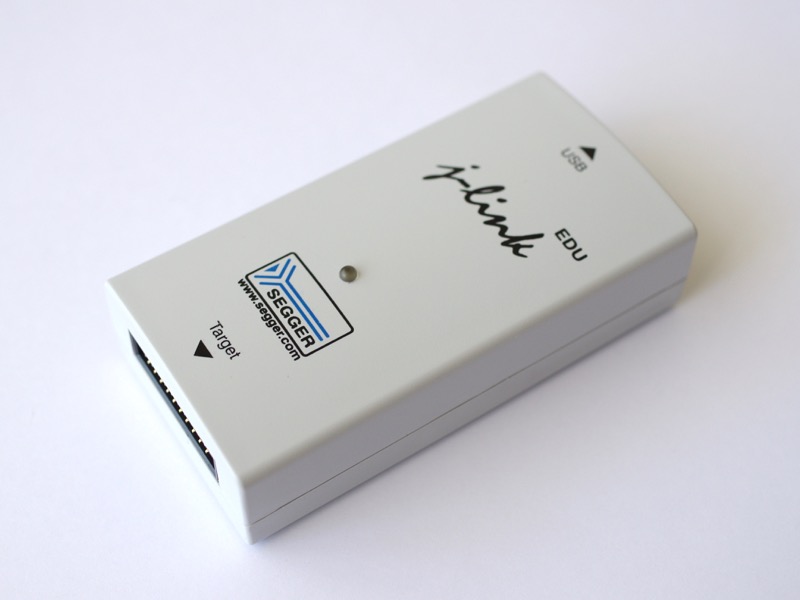
The Segger J-Link line includes many options, with prices ranging from USD60 to almost USD1800, not to mention the production programmers.

​Luckily, Segger offers the J-Link EDU at USD60 for educational and non-commercial purposes. 

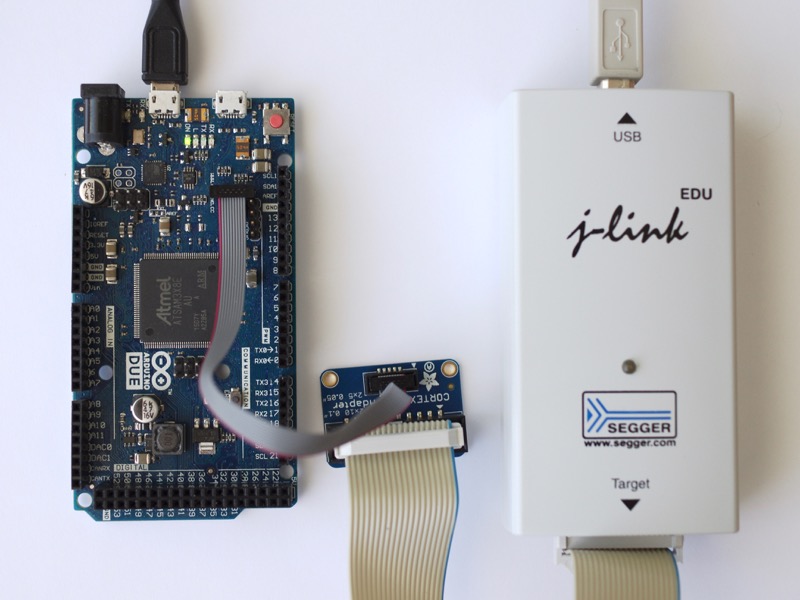
I tested the Segger J-Link Edu version successfully on the Arduino Due,  the Adafruit Feather M0, the Adafruit Feather nRF52, the LaunchPad MSP432. 
​
Picture
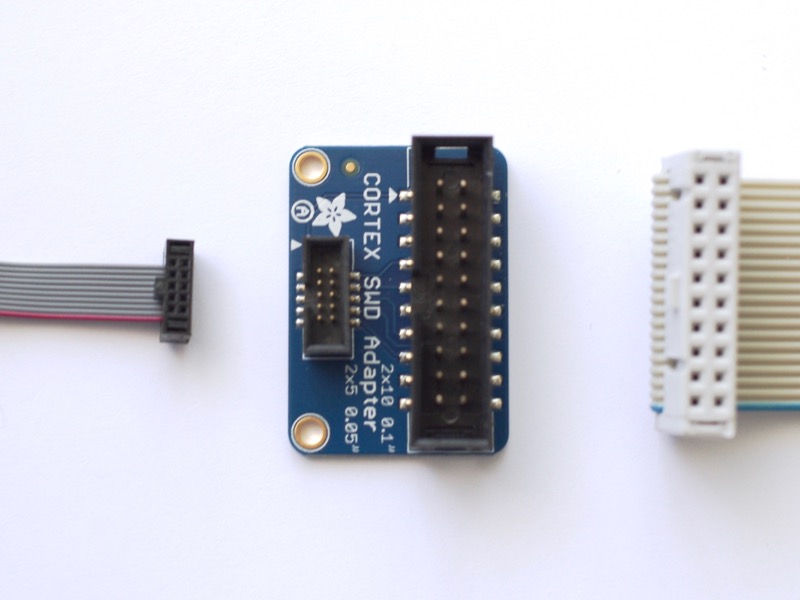
However, I had to solve two challenges.
  • First, I needed an adapter and bought the JTAG (2x10 2.54mm) to SWD (2x5 1.27mm) Cable Adapter Board and a 10-pin 2x5 Socket-Socket 1.27mm IDC (SWD) Cable - 150mm long, both from Adafruit. 
  • Second, I had to place the connector on the right position onto the board or build my own connector to use the Segger J-Link.
Picture

Connecting to Boards 

Two connections are available:
  • JTAG with 4 signals, TCK, TMS, TDI and TDO
  • SWD with 2 signals, CLK and DIO, and optional serial port

GND is connected to the ground of the target. VTref is connected to the VCC of the target to set the logic level.

​Optionally, the programmer-debugger can power the target, albeit in +5V only.
I've tested the Segger J-Link with the following boards:
  • Adafruit Feather M0 and Adafruit Feather M4
  • Adafruit Feather nRF52
  • Arduino Due
  • ​Arduino Primo Core
  • LaunchPad MSP432

​Really nice to have the same tools for all the boards!
Picture

Software

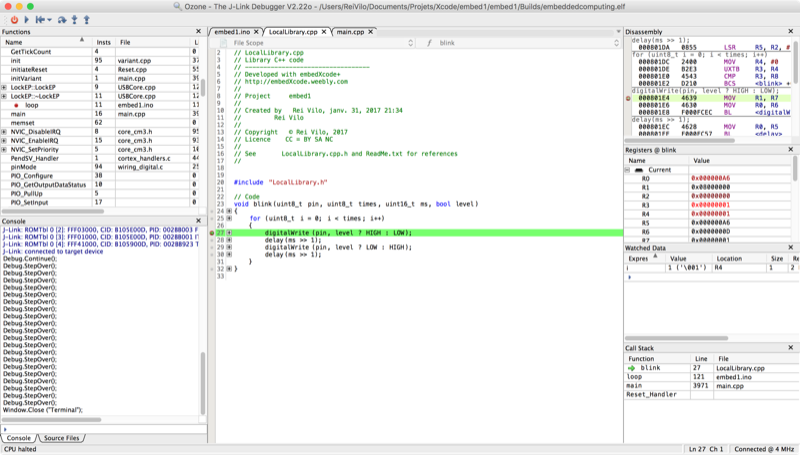
Segger provides the basic J-Link Tools Suite, and more elaborate applications like Ozone, a graphical debugger.

Most of the utilities support Windows, macOS and Linux.

​Go to the review of the Segger J-Link Software.
Picture

Additional features

Additionally, the Segger J-Link Edu debug probe can power the board directly and re-route a serial console.
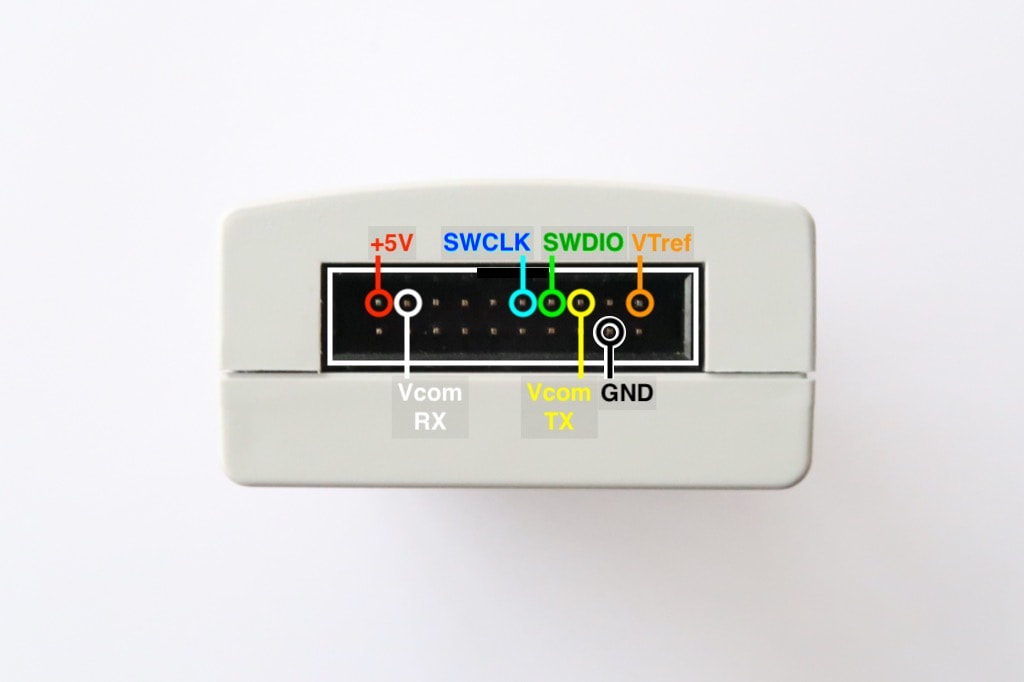
  • The Segger J-Link Edu debug probe can power the board with +5 V (300mA maximum, pin 19), while the logic level is set through VTref (target reference voltage, pin 1).
  • The Segger J-Link Edu debug probe features VCOM and re-routes a serial console through J-Link TX (pin 5) and J-Link RX (pin 17).

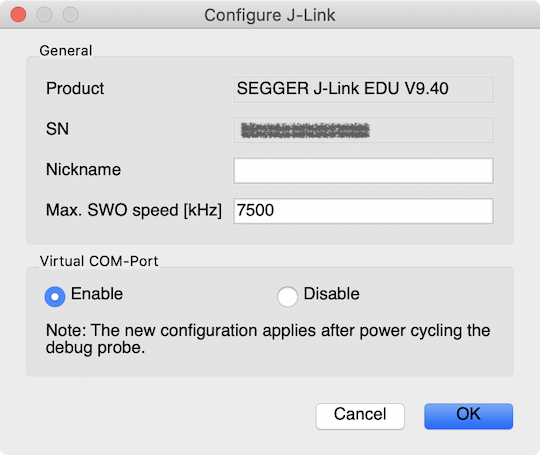
This feature is disabled by default and is only valid with SWD.

To enable it, launch JLinkConfig and set Virtual COM-Port to Enable. Power-cycle the probe. 
Picture
Picture
If the probe has the serial number 123456789, the serial port is re-routed to /dev/tty.usbmodem000123456789.​

More information is available at the
Interface Description and  J-Link Debug Probes pages.


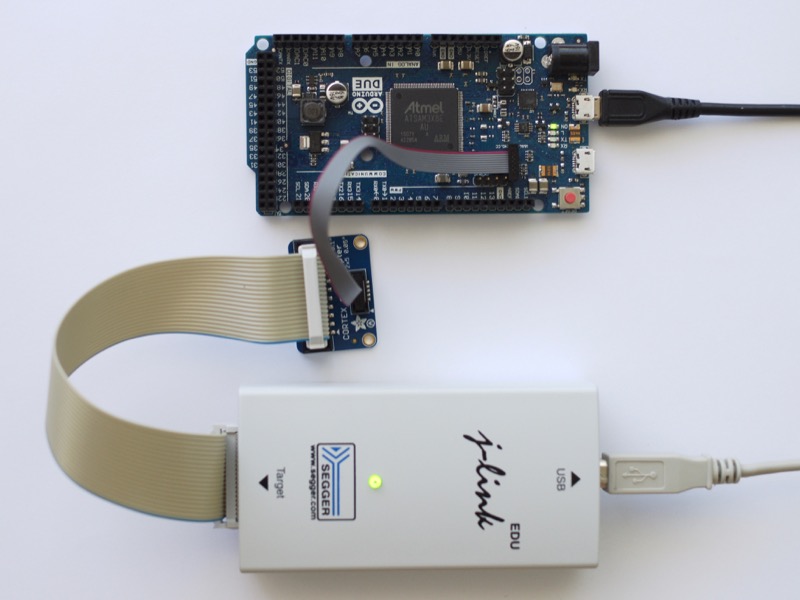
Example of SWD configuration
with re-routed serial port (Vcom)
Picture

​Conclusion

​I'm very happy with this Segger J-Link programmer-debugger. It is fast, comes with reliable software and well-written documentation. The Ozone application offers a decent graphical interface for debugging.

​Support is very responsive and provided through the Segger forum.

I've added support for debugging against the Adafruit Feather M0, Adafruit Feather nRF52, Arduino Due, Arduino Primo Core boards with the Segger J-Link.

A new product offers the same features for less than USD20: see the
 Segger J-Link EDU mini Programmer-Debugger.
Picture

Pros

  • One debugger for almost all Cortex-M and Cortex-A MCUs
  • Software suite
  • Extensive documentation

Cons

  • Some issues with OpenOCD
  • Some boards lacks fool-proof SWD connector

Wrap-Up

  • Specific offer for educational and non-commercial usage
  • Reliable software and extensive documentation  
  • Great value

Links

  • Segger website
  • Product page​
  • Segger forum
  • Supported MCUs
Picture

​Posted: 22 Aug 2016
Updated: 08 
Sept 2017, 20 Jan 2020, 31 Jan 2020, 25 Apr 2022

Powered by Create your own unique website with customizable templates.