Embedded Computing
  • About
  • Blog
  • Hardware
    • Which Platform?
    • Controller Platforms >
      • Adafruit Platform
      • Arduino Plaform
      • BBC micro:bit
      • Espressif Platform
      • iLabs Platform
      • Raspberry Pi Platform (MCU)
      • Seeed Platform
      • Silicon Labs Platform
      • Teensy Plaform
    • Computer Platforms >
      • BeagleBone Platform
      • Raspberry Pi Platform (SBC)
      • UDOO Platform
    • Peripherals >
      • Shields
      • Grove System
      • Sensors
      • Actuators
    • Displays >
      • E-Paper Displays
      • Reflective Displays
      • TFT Displays
      • LCD Displays
    • Legacy Platforms >
      • chipKIT Plaform
      • 4D Systems Platform
      • Intel Platform
      • LaunchPad Plaform
      • BoosterPacks for LaunchPads
      • LightBlue Bean
      • Maple Plaform
      • Mediatek Platform
      • Microsoft Azure IoT DevKit
      • Particle Platform
  • Software
    • Exploring RTOS with Galaxia >
      • Event Library
      • Semaphore Library
      • Mailbox Library
      • Timer Library
      • Clock Library
      • SWI Library
      • Task Library
    • Ultra-Low Power with EnergyTrace >
      • Ultra-Low Power with MSP430
      • Ultra-Low Power with Energia MT and Galaxia
    • Using Integers Instead of Reals
    • Going Python?
  • IoT
    • IoT Platforms: Which Hardware? >
      • Matter with Silicon Labs MG24
    • IoT Services: Which Solution? >
      • Recommended IoT Solutions
      • Platform-Specific IoT Solutions
      • Other IoT Solutions
      • Not tested IoT Solutions
      • Notification Solutions
    • Get Date and Time from Internet with NTP
    • Fast and Easy WiFi Connection with QR-Code
  • Tools
    • How to Start?
    • Reference >
      • Asking for Help
      • Boards Pins Maps
      • Ruler
      • Boards and Plugs
      • I²C Logic Level Converter
      • Standards for Connectors
    • Training >
      • Texas Instruments Workshops
      • Embedded Systems: Shape The World — MOOC edX UTAustinX UT.6.02x
      • Embedded Systems - Shape The World: Microcontroller Input/Output — MOOC edX UTAustinX UT.6.10x
      • Embedded Systems - Shape The World: Multi-Threaded Interfacing — MOOC edX UTAustinX UT.6.20x
      • Real-Time Bluetooth Networks: Shape the World — MOOC edX UTAustinX UT.RTBN.12.01x
      • Systems Thinking with Texas Instruments Robotics System Learning Kit
    • Books >
      • Getting Started with the MSP430 LaunchPad
      • Getting Started with Arduino
      • Arduino Cookbook
    • IDE >
      • The Battle of IDEs
      • More Options
      • Assessing the Next Generation of IDEs
      • Tools for Documentation
    • Equipment >
      • Saleae Logic Analyser
      • Rigol DS1102E Oscilloscope
      • XDS110 Debug Probe with EnergyTrace​
      • Segger J-Link Programmer-Debugger
      • Nordic Power Profiler Kit II
  • Projects
    • Libraries >
      • Master I²C Software Library
      • Date and Time Library
      • highView Library Suite
      • Others Libraries
    • smartDevices >
      • I²C smartColours Smart Sensor
      • I²C smartRFID Smart Sensor
      • I²C smartLED Display
      • I²C smartControls Smart Device
      • I²C smartWiFi Smart Device
      • I²C smartBLE Smart Device
      • I²C smartNode Smart Device
    • IoT Projects >
      • Remote E-Paper Weather and Message Board
      • Typie-Walkie with LoRa and E-Paper Screen
      • Typie-Walkie with E-Paper Screen
      • Remote e-Paper Pictures Panel
      • Remote e-Paper Messages Panel
      • Industrial IoT Project
      • Remote Contactless Temperature Monitor
      • Using Node-RED for IIoT
      • Low Power Home Network Weather Monitoring
      • Updated Low Power Home Network Weather Monitoring
      • Weather and Security Station with Blynk
      • SensorTag to Blynk Using Node-RED
      • Pervasive Reporting
    • AI Projects >
      • Colour Recognition with Neural Network
    • Other Projects >
      • Air Quality Monitoring
      • Driving a Large E-Paper Display with a Compact Xiao RP2040
      • Low-Power E-Paper Weather Station
      • Portable Particulate​ Matter Monitor
      • FRAM-based E-Paper Screen Controller
      • General Purpose 3.5" Screen
      • Colour Recognition with Neural Network
      • A Low Power Weather Station
      • Digital Volt-Amp-Watt Meter
      • Mobile Measurement with LCD Display
      • Screen with SRAM for GUI
      • Volt-Amp-Watt-Meter for Grove
      • Multi-Touch Project with CapTIvate

Robotics System Learning Kit Max

The second generation of the Texas Instruments Robotics System Learning Kit brings dramatic improvements over the first one.

Both versions are part of the MOOC Systems Thinking with Texas Instruments Robotics System Learning Kit.

The kit was sampled by Texas Instruments University.

Hardware

The kit comes in a big box, with all the component to build the robot.

Compared to the previous generation, the major update is the kit is now solder-less, while featuring the same set of sensors. The only safety measure consists on removing the +5V jumper on the MSP432 LaunchPad.

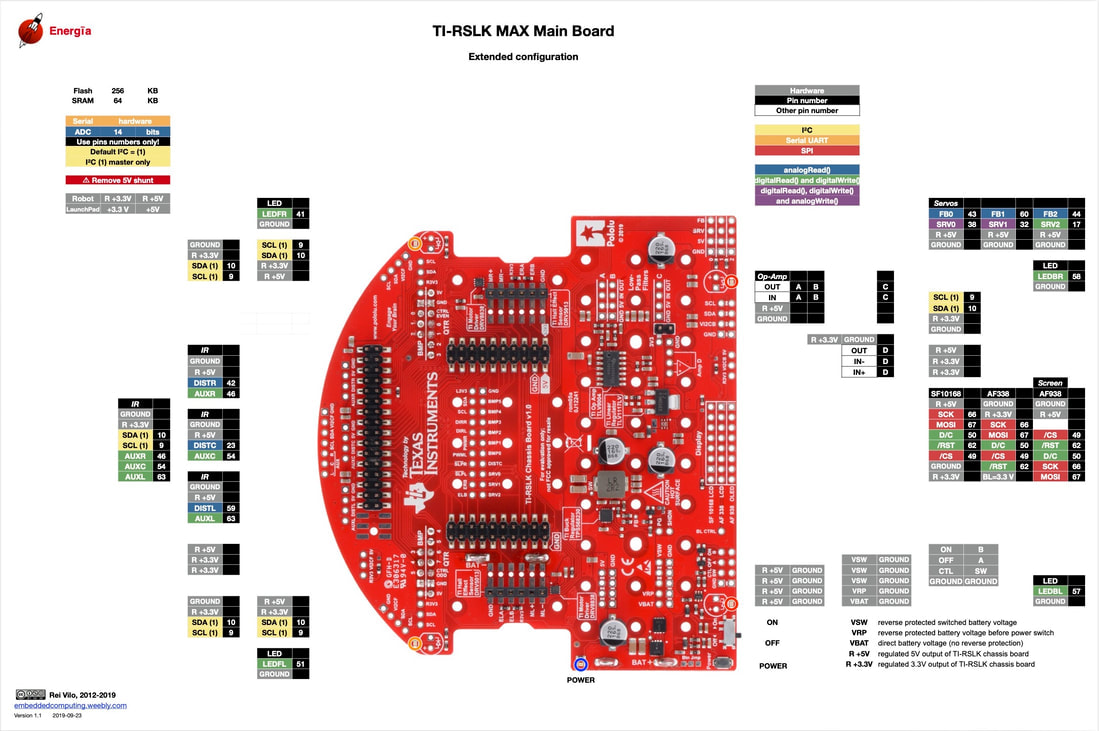
Pins Maps

There are four pins maps for the RSLK-MAX: 
  • base and extended configuration,
  • base configuration,
  • extended configuration and
  • main board.
Picture

Software

As for the previous generation, the Energia-RSLK-Library provides a high-level interface for all components and brings basic examples  for bumper switches, encoder motor and line follower.

​The example for the Sharp GP2Y0A21IR distance sensor only needs a minor adaptation of the pins.

My Own Experience

Building the kit took me less than 15 minutes from start to finish. I followed the instructions from the TI-RSLK-MAX Kit Construction Guide and faced no difficulties in assembling the kit​.

Then, I used the basic examples to test each component: bumper switches, encoder motors and line follower. 

When tested with macOS, the USB ports weren't correctly enumerated. Removing the additional +3.3V jumper on the MSP432 LaunchPad solved the issue.

Conclusion

This second generation is a welcome update of the Robotics System Learning Kit. Thanks to the solder-less design and the basic examples, the robot is up and running is 15 minutes. 

The wire-less expansions for the robot include the BLE CC2650 BoosterPack and the WiFi CC3100 BoosterPack. However, only basic telemetry is possible. Using the moving robot with an USB cable isn't easy. Let's hope for an OTA implementation along the existing basic telemetry.

Pros

  • All-in-one solder-less kit built in less than 15 minutes
  • Great labs with tools
  • Basic examples great to start
  • ​Extensive learning material

Cons

  • Limited wireless features

Wrap-Up

  • ​Be ready to invest time and effort to make  this course successful

Links

  • Texas Instruments University website
  • University of Texas at Austin website
  • TI Robotics System Learning Kit
  • TI-RSLK Maze Edition Curriculum
  • TI-RSLK-MAX Kit Construction Guide​
  • Pololu TI-RSLK Parts and Accessories page
  • TI-RSLK Kits at Farnell - element14
Picture
Picture
Picture
Picture
Powered by Create your own unique website with customizable templates.