Embedded Computing
  • About
  • Blog
  • Hardware
    • Which Platform?
    • Controller Platforms >
      • Adafruit Platform
      • Arduino Plaform
      • BBC micro:bit
      • Espressif Platform
      • iLabs Platform
      • Raspberry Pi Platform (MCU)
      • Seeed Platform
      • Silicon Labs Platform
      • Teensy Plaform
    • Computer Platforms >
      • BeagleBone Platform
      • Raspberry Pi Platform (SBC)
      • UDOO Platform
    • Peripherals >
      • Shields
      • Grove System
      • Sensors
      • Actuators
    • Displays >
      • E-Paper Displays
      • Reflective Displays
      • TFT Displays
      • LCD Displays
    • Legacy Platforms >
      • chipKIT Plaform
      • 4D Systems Platform
      • Intel Platform
      • LaunchPad Plaform
      • BoosterPacks for LaunchPads
      • LightBlue Bean
      • Maple Plaform
      • Mediatek Platform
      • Microsoft Azure IoT DevKit
      • Particle Platform
  • Software
    • Exploring RTOS with Galaxia >
      • Event Library
      • Semaphore Library
      • Mailbox Library
      • Timer Library
      • Clock Library
      • SWI Library
      • Task Library
    • Ultra-Low Power with EnergyTrace >
      • Ultra-Low Power with MSP430
      • Ultra-Low Power with Energia MT and Galaxia
    • Using Integers Instead of Reals
    • Going Python?
  • IoT
    • IoT Platforms: Which Hardware? >
      • Matter with Silicon Labs MG24
    • IoT Services: Which Solution? >
      • Recommended IoT Solutions
      • Platform-Specific IoT Solutions
      • Other IoT Solutions
      • Not tested IoT Solutions
      • Notification Solutions
    • Get Date and Time from Internet with NTP
    • Fast and Easy WiFi Connection with QR-Code
  • Tools
    • How to Start?
    • Reference >
      • Asking for Help
      • Boards Pins Maps
      • Ruler
      • Boards and Plugs
      • I²C Logic Level Converter
      • Standards for Connectors
    • Training >
      • Texas Instruments Workshops
      • Embedded Systems: Shape The World — MOOC edX UTAustinX UT.6.02x
      • Embedded Systems - Shape The World: Microcontroller Input/Output — MOOC edX UTAustinX UT.6.10x
      • Embedded Systems - Shape The World: Multi-Threaded Interfacing — MOOC edX UTAustinX UT.6.20x
      • Real-Time Bluetooth Networks: Shape the World — MOOC edX UTAustinX UT.RTBN.12.01x
      • Systems Thinking with Texas Instruments Robotics System Learning Kit
    • Books >
      • Getting Started with the MSP430 LaunchPad
      • Getting Started with Arduino
      • Arduino Cookbook
    • IDE >
      • The Battle of IDEs
      • More Options
      • Assessing the Next Generation of IDEs
      • Tools for Documentation
    • Equipment >
      • Saleae Logic Analyser
      • Rigol DS1102E Oscilloscope
      • XDS110 Debug Probe with EnergyTrace​
      • Segger J-Link Programmer-Debugger
      • Nordic Power Profiler Kit II
  • Projects
    • Libraries >
      • Master I²C Software Library
      • Date and Time Library
      • highView Library Suite
      • Others Libraries
    • smartDevices >
      • I²C smartColours Smart Sensor
      • I²C smartRFID Smart Sensor
      • I²C smartLED Display
      • I²C smartControls Smart Device
      • I²C smartWiFi Smart Device
      • I²C smartBLE Smart Device
      • I²C smartNode Smart Device
    • IoT Projects >
      • Remote E-Paper Weather and Message Board
      • Typie-Walkie with LoRa and E-Paper Screen
      • Typie-Walkie with E-Paper Screen
      • Remote e-Paper Pictures Panel
      • Remote e-Paper Messages Panel
      • Industrial IoT Project
      • Remote Contactless Temperature Monitor
      • Using Node-RED for IIoT
      • Low Power Home Network Weather Monitoring
      • Updated Low Power Home Network Weather Monitoring
      • Weather and Security Station with Blynk
      • SensorTag to Blynk Using Node-RED
      • Pervasive Reporting
    • AI Projects >
      • Colour Recognition with Neural Network
    • Other Projects >
      • Air Quality Monitoring
      • Driving a Large E-Paper Display with a Compact Xiao RP2040
      • Low-Power E-Paper Weather Station
      • Portable Particulate​ Matter Monitor
      • FRAM-based E-Paper Screen Controller
      • General Purpose 3.5" Screen
      • Colour Recognition with Neural Network
      • A Low Power Weather Station
      • Digital Volt-Amp-Watt Meter
      • Mobile Measurement with LCD Display
      • Screen with SRAM for GUI
      • Volt-Amp-Watt-Meter for Grove
      • Multi-Touch Project with CapTIvate

Qt Editor

I ran the same two tests with Qt Editor: the first with the makefiles from embedXcode, the second with the proprietary Qbs build manager.

The Qt Editor IDE comes in two flavours: one for community and another commercial.

I'm already using Qt Editor for developing against the BeagleBone and the Raspberry Pi. I especially enjoy the clean interface and integrated debugging.
​
Picture
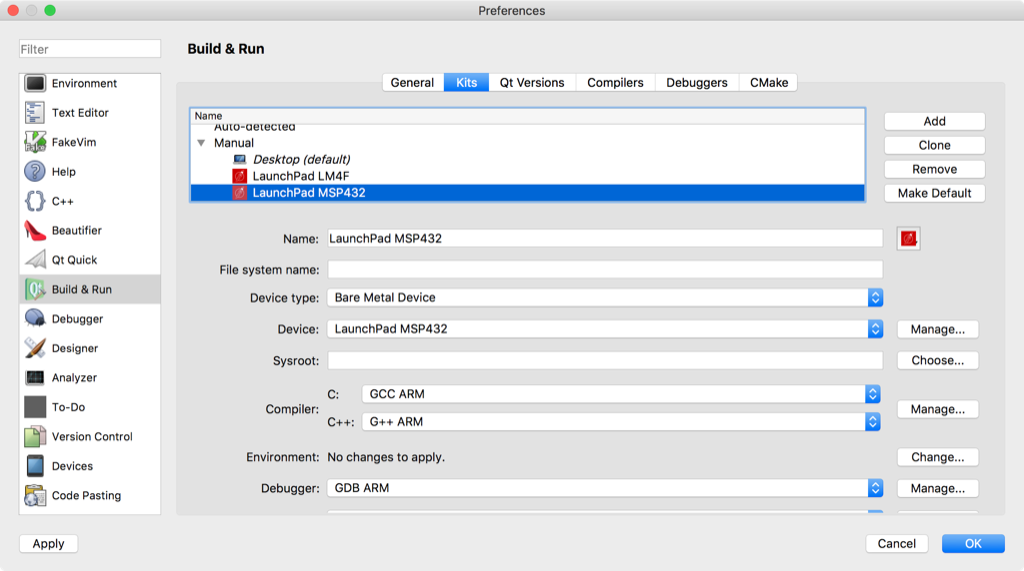
Each board is considered as a kit.

The kit lists all the parameters: the kind of device and device, the compiler and debugger.


Picture
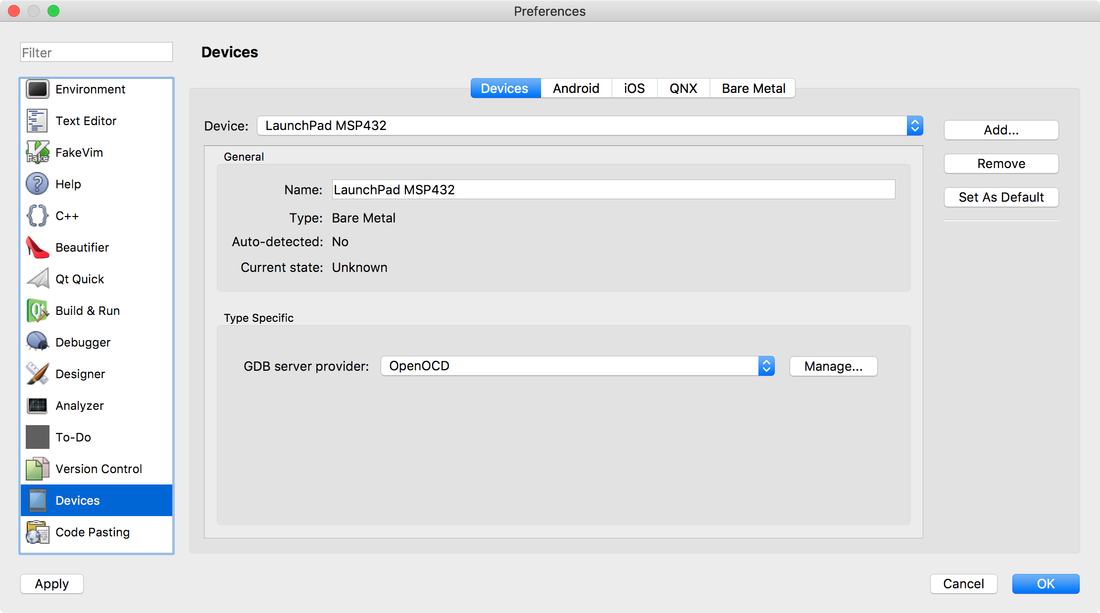
The device defines the GDB server provider.
Picture

Using make and the makefiles

The first test uses the makefiles I've been developing for embedXcode since 2010.

No surprise, almost no customisation was needed.

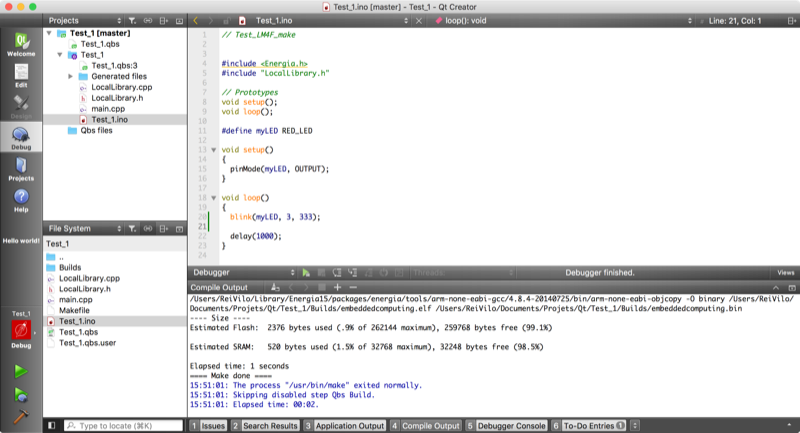
The editor features auto-completion and contextual documentation. Here, the 
parameters for the blink() function are listed.

Picture
Picture
I targeted the LaunchPad TivaC, with a built-in hardware debugger.

Building and linking, uploading and running were completed successfully.


Picture
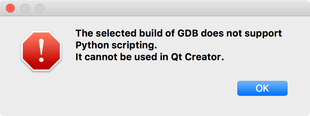
However, debugging wasn't possible, as Qt requires GDB with Python script.

Unfortunately, the GCC ARM tool-chain doesn't provide this option by default as per this 
answer on the FAQs.
Picture

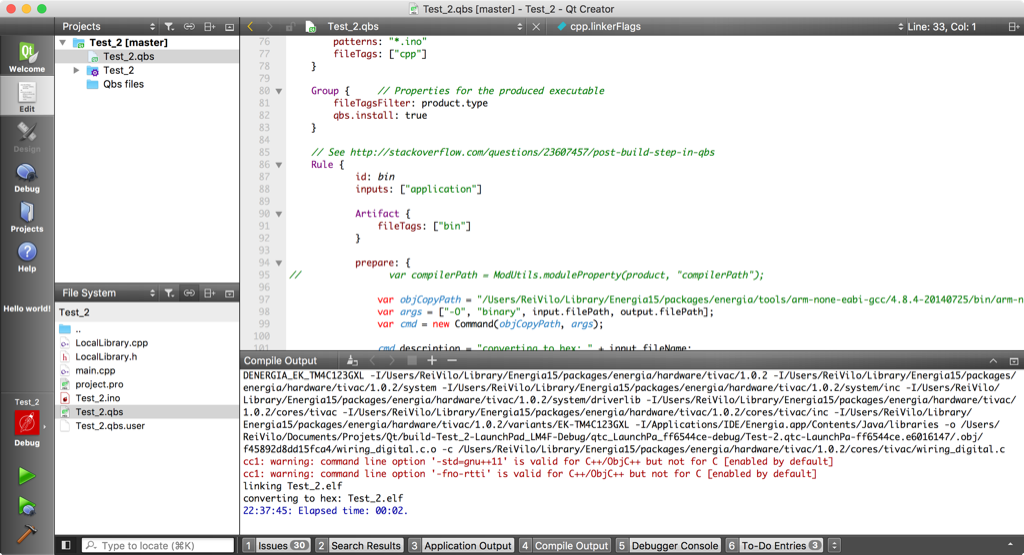
Using Qbs

Qt offers three options as build managers: generic CMake, proprietary qmake and Qbs. 

I tried the Qbs solution. ​However, its failed due to its limited documentation. 

The Qbs Manual > List of Modules > Module cpp page only lists the variables, with no explanation. I went through the The Obligatory Hello World Example and the Qbs Quick Reference, to no avail.

I asked for help on the forum QBS 1.7.1 on Qt Creator 4.2.1 — Link Fails Due to cpp.linkerFlags Parameters Order but haven't received any answer so far. 

So I reported a bug, and get useful tips. Eventually, I managed to build and link my example. 

On 29 October 2018, Qt announced that Qbs is deprecated.
Picture

Conclusion

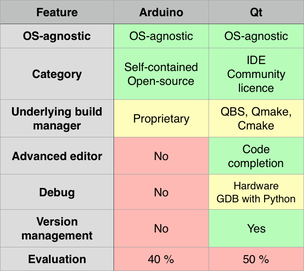
Despite the nice and promising features of Qt, completing my tests with the property Qbs build manager was more difficult than expected.

I hope the limitations about Qbs are going to be solved. Priority number 1 is a decent documentation.

Again, the implementation with the makefiles from embedXcode is a clear winner.
Picture

Pros

  • Great editor
  • Easy implementation of the embedXcode makefiles
  • Each board implemented as a kit​

Cons

  • No documentation for Qbs
  • Question not answered on the forum to be escalated as bug to obtain a solution

Wrap-Up

  • Not fully tested

Links

  • Qt
  • Qt community
  • embedXcode
Picture

Posted 11 May 2017
Updated 16 June 2017, 19 January 2019

Powered by Create your own unique website with customizable templates.