Embedded Computing
  • About
  • Blog
  • Hardware
    • Which Platform?
    • Controller Platforms >
      • Adafruit Platform
      • Arduino Plaform
      • BBC micro:bit
      • Espressif Platform
      • iLabs Platform
      • Raspberry Pi Platform (MCU)
      • Seeed Platform
      • Silicon Labs Platform
      • Teensy Plaform
    • Computer Platforms >
      • BeagleBone Platform
      • Raspberry Pi Platform (SBC)
      • UDOO Platform
    • Peripherals >
      • Shields
      • Grove System
      • Sensors
      • Actuators
    • Displays >
      • E-Paper Displays
      • Reflective Displays
      • TFT Displays
      • LCD Displays
    • Legacy Platforms >
      • chipKIT Plaform
      • 4D Systems Platform
      • Intel Platform
      • LaunchPad Plaform
      • BoosterPacks for LaunchPads
      • LightBlue Bean
      • Maple Plaform
      • Mediatek Platform
      • Microsoft Azure IoT DevKit
      • Particle Platform
  • Software
    • Exploring RTOS with Galaxia >
      • Event Library
      • Semaphore Library
      • Mailbox Library
      • Timer Library
      • Clock Library
      • SWI Library
      • Task Library
    • Ultra-Low Power with EnergyTrace >
      • Ultra-Low Power with MSP430
      • Ultra-Low Power with Energia MT and Galaxia
    • Using Integers Instead of Reals
    • Going Python?
  • IoT
    • IoT Platforms: Which Hardware? >
      • Matter with Silicon Labs MG24
    • IoT Services: Which Solution? >
      • Recommended IoT Solutions
      • Platform-Specific IoT Solutions
      • Other IoT Solutions
      • Not tested IoT Solutions
      • Notification Solutions
    • Get Date and Time from Internet with NTP
    • Fast and Easy WiFi Connection with QR-Code
  • Tools
    • How to Start?
    • Reference >
      • Asking for Help
      • Boards Pins Maps
      • Ruler
      • Boards and Plugs
      • I²C Logic Level Converter
      • Standards for Connectors
    • Training >
      • Texas Instruments Workshops
      • Embedded Systems: Shape The World — MOOC edX UTAustinX UT.6.02x
      • Embedded Systems - Shape The World: Microcontroller Input/Output — MOOC edX UTAustinX UT.6.10x
      • Embedded Systems - Shape The World: Multi-Threaded Interfacing — MOOC edX UTAustinX UT.6.20x
      • Real-Time Bluetooth Networks: Shape the World — MOOC edX UTAustinX UT.RTBN.12.01x
      • Systems Thinking with Texas Instruments Robotics System Learning Kit
    • Books >
      • Getting Started with the MSP430 LaunchPad
      • Getting Started with Arduino
      • Arduino Cookbook
    • IDE >
      • The Battle of IDEs
      • More Options
      • Assessing the Next Generation of IDEs
      • Tools for Documentation
    • Equipment >
      • Saleae Logic Analyser
      • Rigol DS1102E Oscilloscope
      • XDS110 Debug Probe with EnergyTrace​
      • Segger J-Link Programmer-Debugger
      • Nordic Power Profiler Kit II
  • Projects
    • Libraries >
      • Master I²C Software Library
      • Date and Time Library
      • highView Library Suite
      • Others Libraries
    • smartDevices >
      • I²C smartColours Smart Sensor
      • I²C smartRFID Smart Sensor
      • I²C smartLED Display
      • I²C smartControls Smart Device
      • I²C smartWiFi Smart Device
      • I²C smartBLE Smart Device
      • I²C smartNode Smart Device
    • IoT Projects >
      • Remote E-Paper Weather and Message Board
      • Typie-Walkie with LoRa and E-Paper Screen
      • Typie-Walkie with E-Paper Screen
      • Remote e-Paper Pictures Panel
      • Remote e-Paper Messages Panel
      • Industrial IoT Project
      • Remote Contactless Temperature Monitor
      • Using Node-RED for IIoT
      • Low Power Home Network Weather Monitoring
      • Updated Low Power Home Network Weather Monitoring
      • Weather and Security Station with Blynk
      • SensorTag to Blynk Using Node-RED
      • Pervasive Reporting
    • AI Projects >
      • Colour Recognition with Neural Network
    • Other Projects >
      • Air Quality Monitoring
      • Driving a Large E-Paper Display with a Compact Xiao RP2040
      • Low-Power E-Paper Weather Station
      • Portable Particulate​ Matter Monitor
      • FRAM-based E-Paper Screen Controller
      • General Purpose 3.5" Screen
      • Colour Recognition with Neural Network
      • A Low Power Weather Station
      • Digital Volt-Amp-Watt Meter
      • Mobile Measurement with LCD Display
      • Screen with SRAM for GUI
      • Volt-Amp-Watt-Meter for Grove
      • Multi-Touch Project with CapTIvate

Pressure Sensor

I selected a pressure sensor from Freescale Semiconductor wide range. I picked up one with the following specifications: integrated, absolute measure, 0 to 250 kPa. 

It comes in various form-factors, either small outline / surface mount package or unibody package, with or without a nose.

The manufacturer provides an excellent application note Understanding Pressure and Pressure Measurement. 

The sensor provides a voltage linear to the pressure measured. So implementation is rather easy. 

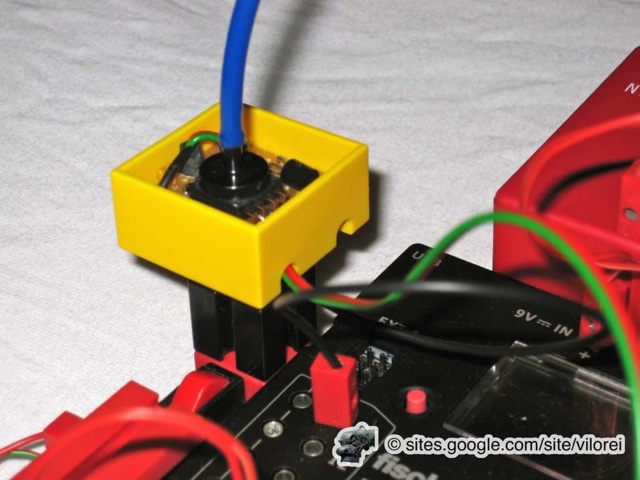
After extensive testing with the Arduino board, I went into packing the sensor into a fischertechnik block so I could use it with my industrial models. 
Picture

Hardware

The sensor is powered by a fischertechnik battery. Signal is sent to A0 analog input. 

When used, SD card is connected to TX → 1 pin.

I guess the hardware has a consequence on the measures: 
  • the Arduino processor runs at 16 MHz, 
  • the SD card is linked through a serial connection at 19200 bps,  
  • the USB connection speed to the PC is 57600 bps. 
Not to mention the not-optimised code. 

Software

Here are the measures with the SD-card and USB connection: 

  • Autonomous SD OpenLog
The SD card is connected to TX → 1 pin.
Serial speed to SD card = 19200 bps
Measure rate = up to 115 Hz
Reactivity = 9,8 kPa / two consecutive measures

  • USB Connection to PC
double speed=19600; is replaced by double speed=57800;
USB serial speed to PC = 57600 bps
Measure rate = up to 350 Hz
Reactivity = 3,6 kPa / two consecutive measures

Measures rate and reactivity are good enough for my fischertechnik industrial models!

int sensorPin = A0;
float sensorValue = 0; 
double speed=19600; 


void setup() { 
  Serial.begin(speed); 
  Serial.print("\n\n\n\n***\n"); 
  Serial.print("serial speed\t"); 
  Serial.print(speed, 0); 
  Serial.print("\n"); 
  Serial.print("start us\t"); 
  Serial.print(micros()); 
  Serial.print("\n");    
  Serial.print("us\tV\tkPa\n"); 
} 

void loop() { 
  sensorValue = float(analogRead(sensorPin))*5.0/1023.0; 
  Serial.print(micros()); 
  Serial.print("\t"); 
  Serial.print(sensorValue); 
  Serial.print("\t");          
  Serial.print((sensorValue/5.1+0.04)/0.004, 1); 
  Serial.print("\n"); 
}

Pressure Sensor Mathematical Model

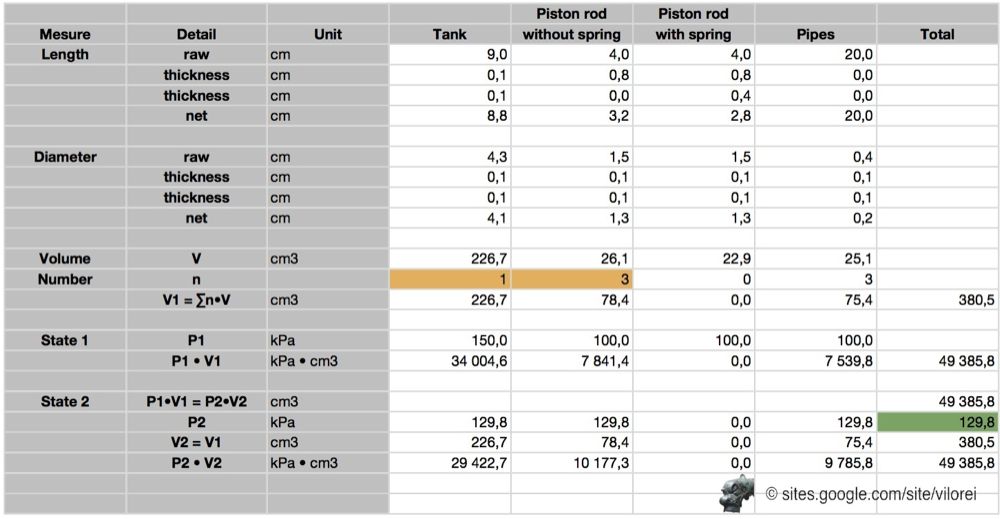
I've built a very basic model based on the ideal gas law (reference).

I considered R and T as constants and took 1 atm close to 100 kPa. Actually, 1 atm = 101,33 kPa instead of 1 atm ≈ 100 kPA.

I measured the volumes of the tank and the piston rods, with and without spring.


PV = nRT

with
  • P = Pressure (in atm)
  • V = Volume (in L)
  • n = moles
  • R = universal gas constant 8.314 J·K−1·mol−1
  • T = Temperature (in K) 

Measures

I conducted two series of measures:
  • 1b— one tank and two piston rods
  • 2b— two tanks and two piston rods

Then I filled the model in with the measures I've recorded.

As always, the model and the measures are provided below. It's always nice to see that Nature obeys physical laws!
Picture

Results

The findings are:
  • 20 s to fill either one or two tanks, from 100 kPa to 160 kPa
  • steps appear around 135 kPa
  • activating a piston rod requires either 10 kPa with 1 tank or 5 kPa with 2 tanks, the same
  • at least 127 kPa of pressure is needed to activate a piston rod, on either one or two tanks
  • one tank can deal with up to three or four piston rods
  • two tanks can deal with four or more and up to 7 piston rods 

Downloads

Please find the RoboPro project and Excel sheets discussed in this article.
smart_pressure-b.rpp.zip
File Size: 25 kb
File Type: zip
Download File

smart_pressure_-b1.xls.zip
File Size: 13 kb
File Type: zip
Download File

smart_pressure_-b2.xls.zip
File Size: 13 kb
File Type: zip
Download File

Powered by Create your own unique website with customizable templates.