Embedded Computing
  • About
  • Blog
  • Hardware
    • Which Platform?
    • Controller Platforms >
      • Adafruit Platform
      • Arduino Plaform
      • BBC micro:bit
      • Espressif Platform
      • iLabs Platform
      • Raspberry Pi Platform (MCU)
      • Seeed Platform
      • Silicon Labs Platform
      • Teensy Plaform
    • Computer Platforms >
      • BeagleBone Platform
      • Raspberry Pi Platform (SBC)
      • UDOO Platform
    • Peripherals >
      • Shields
      • Grove System
      • Sensors
      • Actuators
    • Displays >
      • E-Paper Displays
      • Reflective Displays
      • TFT Displays
      • LCD Displays
    • Legacy Platforms >
      • chipKIT Plaform
      • 4D Systems Platform
      • Intel Platform
      • LaunchPad Plaform
      • BoosterPacks for LaunchPads
      • LightBlue Bean
      • Maple Plaform
      • Mediatek Platform
      • Microsoft Azure IoT DevKit
      • Particle Platform
  • Software
    • Exploring RTOS with Galaxia >
      • Event Library
      • Semaphore Library
      • Mailbox Library
      • Timer Library
      • Clock Library
      • SWI Library
      • Task Library
    • Ultra-Low Power with EnergyTrace >
      • Ultra-Low Power with MSP430
      • Ultra-Low Power with Energia MT and Galaxia
    • Using Integers Instead of Reals
    • Going Python?
  • IoT
    • IoT Platforms: Which Hardware? >
      • Matter with Silicon Labs MG24
    • IoT Services: Which Solution? >
      • Recommended IoT Solutions
      • Platform-Specific IoT Solutions
      • Other IoT Solutions
      • Not tested IoT Solutions
      • Notification Solutions
    • Get Date and Time from Internet with NTP
    • Fast and Easy WiFi Connection with QR-Code
  • Tools
    • How to Start?
    • Reference >
      • Asking for Help
      • Boards Pins Maps
      • Ruler
      • Boards and Plugs
      • I²C Logic Level Converter
      • Standards for Connectors
    • Training >
      • Texas Instruments Workshops
      • Embedded Systems: Shape The World — MOOC edX UTAustinX UT.6.02x
      • Embedded Systems - Shape The World: Microcontroller Input/Output — MOOC edX UTAustinX UT.6.10x
      • Embedded Systems - Shape The World: Multi-Threaded Interfacing — MOOC edX UTAustinX UT.6.20x
      • Real-Time Bluetooth Networks: Shape the World — MOOC edX UTAustinX UT.RTBN.12.01x
      • Systems Thinking with Texas Instruments Robotics System Learning Kit
    • Books >
      • Getting Started with the MSP430 LaunchPad
      • Getting Started with Arduino
      • Arduino Cookbook
    • IDE >
      • The Battle of IDEs
      • More Options
      • Assessing the Next Generation of IDEs
      • Tools for Documentation
    • Equipment >
      • Saleae Logic Analyser
      • Rigol DS1102E Oscilloscope
      • XDS110 Debug Probe with EnergyTrace​
      • Segger J-Link Programmer-Debugger
      • Nordic Power Profiler Kit II
  • Projects
    • Libraries >
      • Master I²C Software Library
      • Date and Time Library
      • highView Library Suite
      • Others Libraries
    • smartDevices >
      • I²C smartColours Smart Sensor
      • I²C smartRFID Smart Sensor
      • I²C smartLED Display
      • I²C smartControls Smart Device
      • I²C smartWiFi Smart Device
      • I²C smartBLE Smart Device
      • I²C smartNode Smart Device
    • IoT Projects >
      • Remote E-Paper Weather and Message Board
      • Typie-Walkie with LoRa and E-Paper Screen
      • Typie-Walkie with E-Paper Screen
      • Remote e-Paper Pictures Panel
      • Remote e-Paper Messages Panel
      • Industrial IoT Project
      • Remote Contactless Temperature Monitor
      • Using Node-RED for IIoT
      • Low Power Home Network Weather Monitoring
      • Updated Low Power Home Network Weather Monitoring
      • Weather and Security Station with Blynk
      • SensorTag to Blynk Using Node-RED
      • Pervasive Reporting
    • AI Projects >
      • Colour Recognition with Neural Network
    • Other Projects >
      • Air Quality Monitoring
      • Driving a Large E-Paper Display with a Compact Xiao RP2040
      • Low-Power E-Paper Weather Station
      • Portable Particulate​ Matter Monitor
      • FRAM-based E-Paper Screen Controller
      • General Purpose 3.5" Screen
      • Colour Recognition with Neural Network
      • A Low Power Weather Station
      • Digital Volt-Amp-Watt Meter
      • Mobile Measurement with LCD Display
      • Screen with SRAM for GUI
      • Volt-Amp-Watt-Meter for Grove
      • Multi-Touch Project with CapTIvate

LaunchPad CC3200 WiFi

Everyone talks about the Internet of Things but few boards are available. Texas Instruments combines a Cortex-M4 with a built-in WiFi radio.

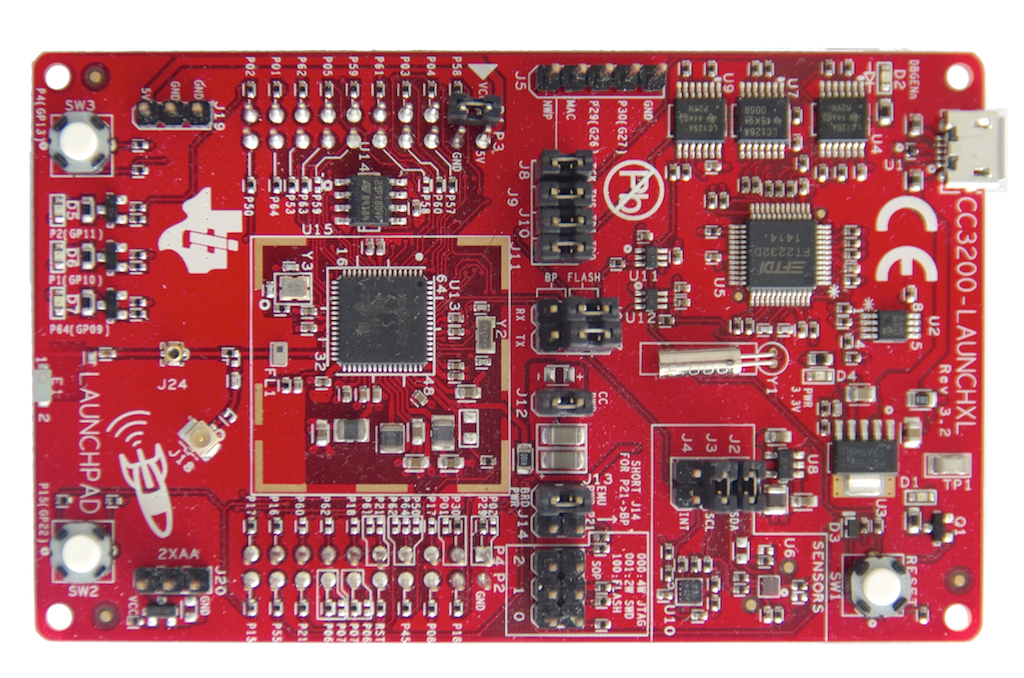
The LaunchPad WiFi with CC3200 is a development platform from Texas Instruments for the 80MHz 32-bit ARM Cortex-M4 CC3200 MCU with 256 KB of RAM. To store the sketches, the board includes 1 MB of additional fast SPI flash. 

The board also features 3 LEDs, one reset plus two buttons, a built-in debugger, two sensors —the TMP006 thermometer and the BMA222 accelerometer on the I²C bus—, and connectors for a 40-pin BoosterPack.

There's one serious hardware limitation with the CC3200. Analog inputs are limited to 1.5 V. Higher voltage may zombify the MCU. 

Picture

Software

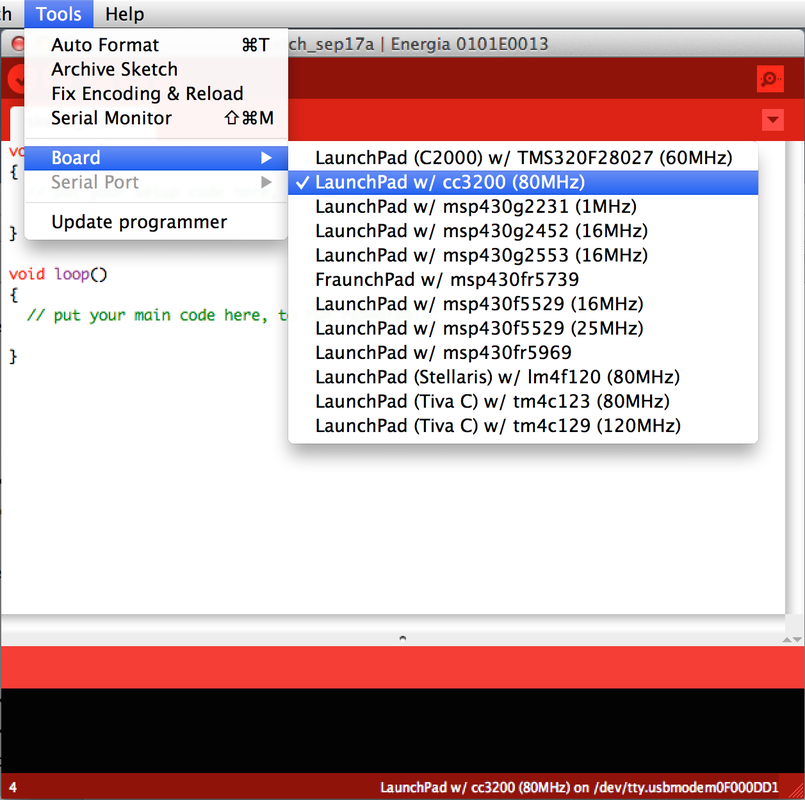
Texas Instruments offers a wide choice of IDEs: CCS, IAR, Energia.

The Arduino-compatible IDE or integrated development environment is called Energīa. 

It is derived from Arduino 1.0. As Processing-based Wiring-derived, it is platform-agnostic and runs on Windows, Mac OS X or Linux.  

The LaunchPad WiFi with CC3200 is supported by embedXcode, embedded computing on Xcode.

Picture
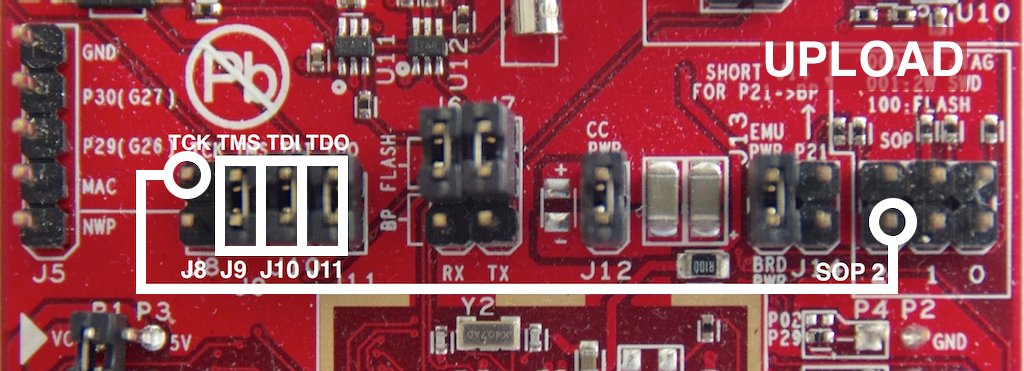
When used with Energia or embedXcode, proceed as follow:
  • Remove the JTAG J8 jumper and the SPO2 jumper.
  • Place a wire from JTAG J8 (emulator side) to SOP2 (CC3200) side.
  • Plug the LaunchPad WiFi with CC3200 board.
The project is uploaded into flash. 
Picture
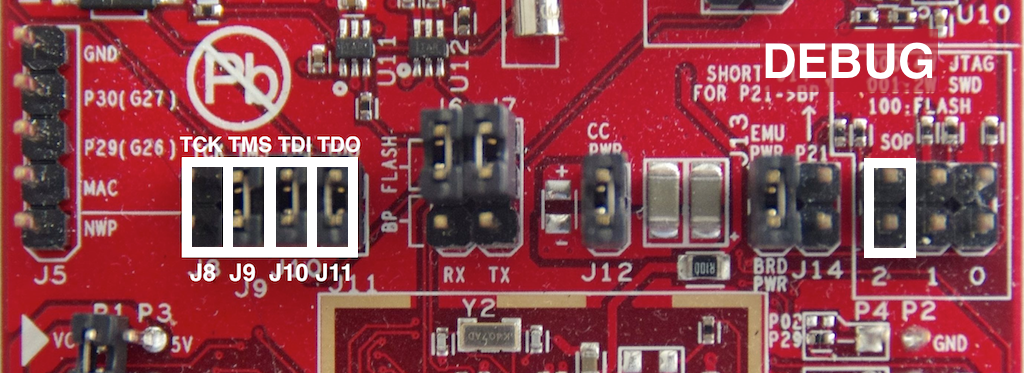
For debugging with embedXcode, proceed as follow:
  • Remove the wire from JTAG J8 (emulator side) to SOP2 (CC3200) side.
  • Place the JTAG J8 jumper.
  • Plug the LaunchPad WiFi with CC3200 board.
  • Launch the target Debug. 
The project is uploaded into SRAM and lost in case the power is disconnected. 
Picture

WiFi Provisionning

There are three different ways to configure the CC3200:
  • An access point (AP) limited to one single station connected to it,
  • A station with hardcoded credentials, with the network name (SSID) and password provided on the code,
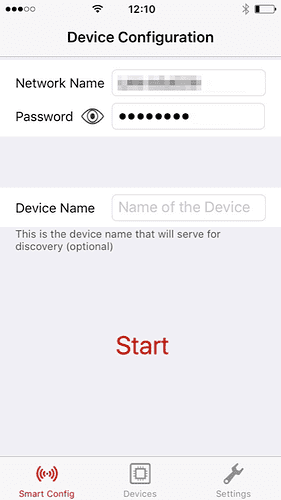
  • A station with SmartConfig, a very easy way thanks to an app available for Android and iOS.

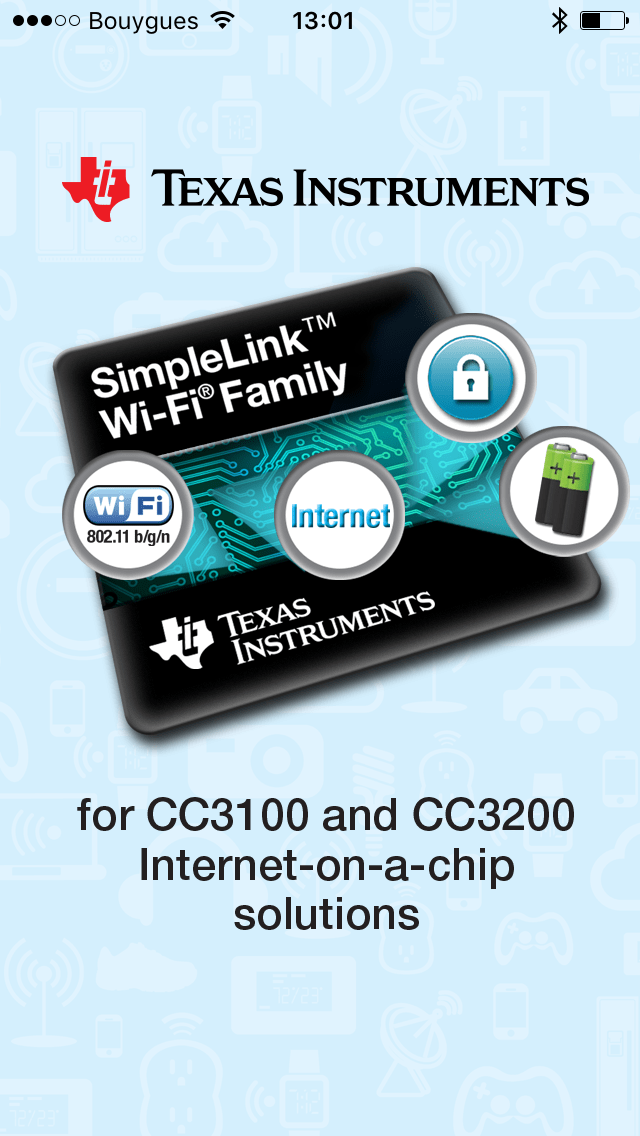
Just connect the smartphone or the tablet to the WiFi LAN and launch the Android or iOS app. Fill in the WiFi LAN password and press Start.

The app looks for the CC3100 or CC3200, configures the device automatically and saves that configuration on the CC3100 or CC3200.
​
Subsequent connections on the CC3100 or CC3200 use the saved configuration.


Picture
Picture

Pins Map

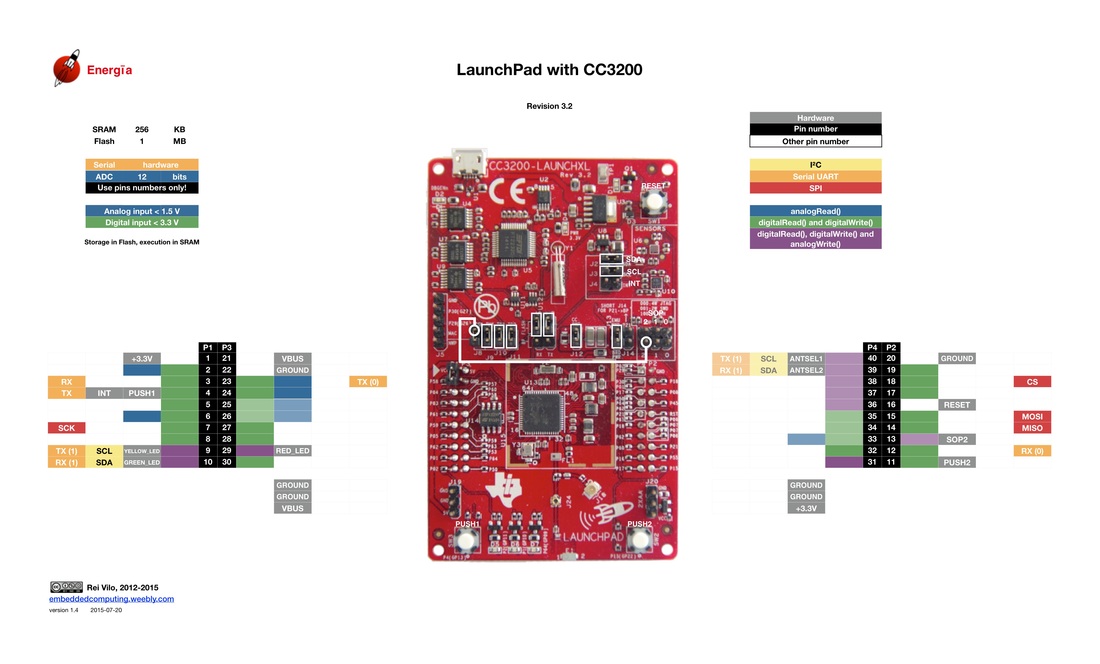
The LaunchPad features multiple SPI, I²C and Serial ports.

The I²C bus for the TMP006 thermometer and the BMA222 accelerometer can be easily disconnected thanks to the SDA, SCL and INT shunts.

Some pins aren't available for the BoosterPack: they're shown with faded colours. The pins names aren't available on Energia: use instead the pins numbers.

Picture

A Perfect Introduction to Internet of Things

The LaunchPad WiFi with CC3200 offers the perfect introduction to the Internet of Things. It is the recommended board based on my extensive review of IoT-capable platforms.

The Cortex-M4 doesn't feature a FPU. The WiFi radio can operate as client or access point. The SimpleLink technology makes the configuration very easy. Technical documentation ensures that full compatibility is guaranteed.

Keep in mind analog inputs are limited to 1.5 V. Higher voltage may zombify the MCU. This LaunchPad is not compatible with the LaunchPad + BoosterPack eco-system.
The analog inputs are limited to 1.5 V. ​Higher voltages may damage the MCU. 
​This LaunchPad is not compatible with BoosterPacks featuring analog inputs.

Pros

  • Very nice package with USB cable, 
  • Large offer in IDEs: 3 professional IDEs from Texas Instruments, Arduino-like Energia, RTOS-based Energia MT, and embedXcode.
  • Very easy WiFi provisionning

Cons

  • Analog inputs limited to 1.5 V
  • No FPU
  • Some pins aren't connected
  • Multiple and confusing pins naming schemes

Wrap-Up

  • Tremendous value
  • The perfect cost-effective introduction to Internet of Things
  • Limited compatibility with the LaunchPad + BoosterPack eco-system
  • Very easy WiFi provisionning

Links

  • Website
  • Wiki
  • E2E forum 
  • Hardware
  • Software and Arduino-like IDE Energia
  • 43oh forum
Picture
Picture

​Posted 2015-07-20 — Edited 2017-01-04
Powered by Create your own unique website with customizable templates.